

How to Implement AI in Your Business
Artificial Intelligence is no longer a buzzword reserved for tech giants. It has become one of the most powerful tools for modern businesses. From startups to established enterprises, companies are using AI to streamline operations, improve customer experiences, and unlock new growth opportunities. Yet, despite its growing importance, many business owners find themselves asking a simple question: where do I start with AI?
The confusion is understandable. With countless tools, platforms, and technical jargon, AI can feel overwhelming. However, implementing AI in your business does not have to be complicated. You do not need a team of data scientists or a massive budget. What you need is a clear strategy and a structured approach.
This below diagram explains how to implement AI in your business in a practical and scalable way.
AI helps machines perform tasks that normally require human intelligence such as understanding language, analyzing data, recognizing patterns, making decisions, and automating repetitive work.
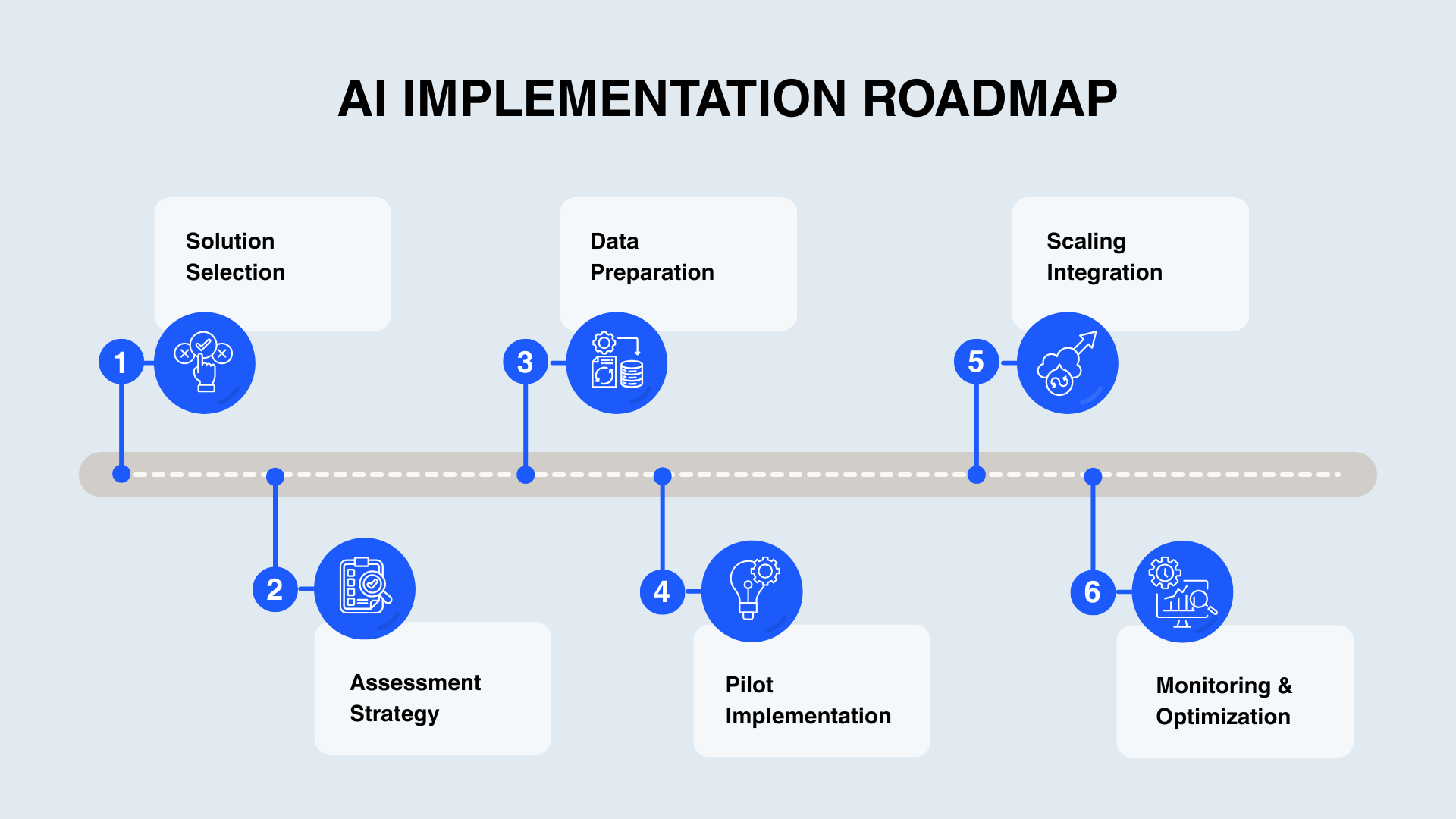
Understanding AI in a Business Context
Before diving into implementation, it is important to understand what AI means in a business environment. AI is not just about complicated coding, advanced mathematics, or futuristic robots shown in movies. In reality, AI is simply a technology that helps machines perform tasks that normally require human intelligence, such as understanding language, analyzing data, recognizing patterns, making decisions, and automating repetitive work. In simple terms, AI helps businesses automate repetitive tasks, analyze data more effectively, and deliver personalized experiences to customers.
Examples include chatbots responding to customer queries, tools generating marketing content, and systems recommending products based on user behaviour. The goal is not to use AI for the sake of it, but to solve real business problems and improve efficiency.
Step 1: Start with a Clear Business Problem
The most common mistake businesses make is starting with tools instead of problems. They adopt AI without a clear purpose, which often leads to wasted time and resources.
Instead, evaluate your business and identify areas where you face challenges. You may be dealing with too many customer queries, low marketing output, inefficient sales processes, or time-consuming manual tasks. AI should always be introduced as a solution to a specific issue. If it is not solving something meaningful, it is not worth implementing.
Step 2: Define the Right Use Case
Once you identify the problem, the next step is to define a relevant AI use case. This means mapping your business challenge to a practical AI application.
For example, if customer support is slow, implementing a chatbot can improve response time. If marketing productivity is low, AI tools can help generate content. In sales, AI can assist with lead scoring and customer insights. In operations, it can automate workflows and reduce manual effort.
Focus on use cases that provide high impact while remaining simple to implement.
Step 3: Choose the Right Tools and Platforms
You do not need to build AI systems from scratch. Today, there are many AI tools available that make implementation easier, faster, and more affordable—even for beginners and small businesses.
Tools like ChatGPT can be used for content creation, customer support, and chatbot functionality. Zapier helps automate workflows by connecting different applications without coding. HubSpot provides AI-powered marketing and sales capabilities, while Google Cloud AI offers advanced AI solutions for businesses that require large-scale or custom implementations.
For businesses looking for free or budget-friendly alternatives, there are several excellent options available. n8n is one of the most powerful open-source automation platforms available today. While the official n8n cloud version offers only a limited free trial, the self-hosted version of n8n is completely free and allows users to create unlimited workflows and AI agents without monthly costs. This makes it an excellent choice for startups, developers, and businesses looking to build advanced automations on a budget.
Another popular option is Make, which provides an easy-to-use visual automation builder along with a free tier for beginners. Pipedream is another strong alternative that is especially useful for developers working with APIs and serverless workflows. Free AI platforms such as Google Gemini and OpenRouter also allow businesses to experiment with AI models and automation without significant upfront investment.
For hosting self-hosted automation tools like n8n, businesses can use affordable or free cloud platforms such as Railway, Render, and Oracle Cloud. These platforms make it possible to run automation systems and AI workflows at minimal or no cost during the early stages of development.
Beginners can start with free no-code tools to quickly test ideas and automate simple tasks. Developers, on the other hand, can integrate APIs or build custom AI systems for more advanced use cases. The key is to choose tools that align with your business goals, technical expertise, scalability requirements, and budget.
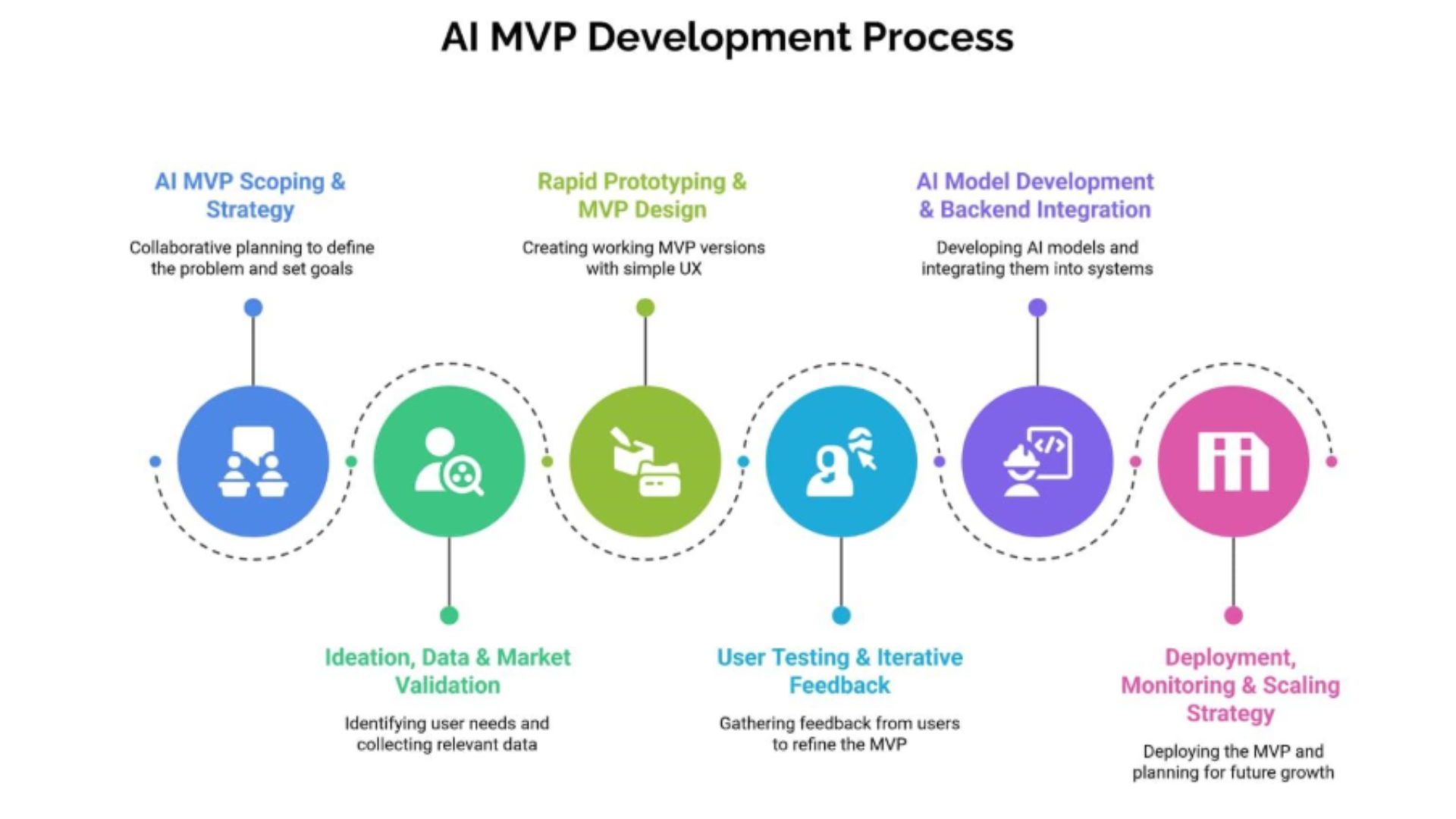
Step 4: Start Small and Build an MVP
Trying to implement AI across your entire business at once can lead to failure. Instead, start with a Minimum Viable Product.
This could be as simple as adding a chatbot to your website, automating email responses, or using AI for content generation. Starting small reduces risk and allows you to test your approach before scaling.
If you are building a startup or platform, focus on one AI-powered feature first. Once it proves successful, expand gradually.
Step 5: Leverage Data Effectively
AI depends on data. Without data, it cannot function effectively. This makes data collection and organization a critical step.
Data can come from website interactions, customer behaviour, CRM systems, and user inputs. It may be structured, such as databases, or unstructured, such as text and emails.
Ensuring that your data is clean, organized, and accessible will significantly improve the performance of your AI systems.
Step 6: Implement, Configure, or Train AI
At this stage, you move from planning to execution. Depending on your approach, this may involve configuring a tool, integrating an API, or training a custom model.
Most businesses can achieve their goals using no-code tools or API-based solutions. Advanced implementations may require custom models, but they are not necessary in most cases.
Focus on achieving results rather than building complex systems.
Step 7: Test, Measure, and Improve
AI implementation is not a one-time process. It requires continuous monitoring and improvement.
Track metrics such as accuracy, user satisfaction, and business impact. If something is not working, refine it. For example, improve chatbot responses or adjust automation workflows.
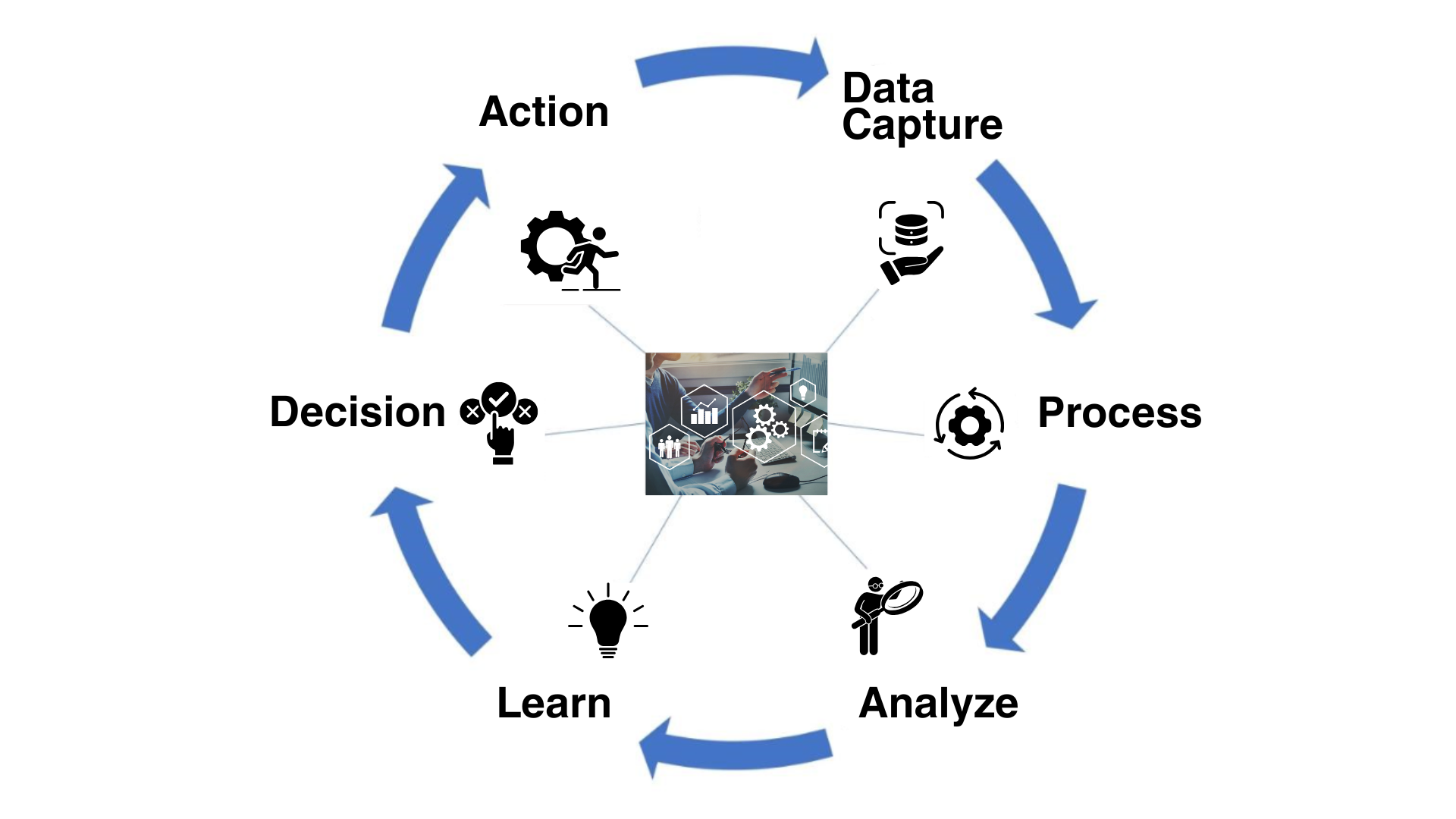
Continuous improvement ensures that your AI system becomes more effective over time.
Unlike traditional software, AI systems continuously evolve and improve through learning and feedback loops.

Step 8: Scale AI Across Your Business
Once the initial AI implementation proves successful, businesses can gradually scale AI into other departments.
- Customer support automation
- Marketing personalization
- Sales intelligence
- Workflow optimization
- Operational analytics
AI should grow alongside your business and support long-term scalability.
Real-World Applications of AI
- E-commerce – Product recommendations and personalized shopping
- Education – Personalized learning experiences
- Healthcare – Data analysis and workflow automation
- Startups – Customer support automation and lead generation
- Business Platforms – AI-driven workflow systems and analytics
AI is transforming industries by helping businesses automate processes and improve user experiences.
Challenges to Consider
Despite its advantages, AI implementation comes with several challenges businesses must carefully manage.
- Data Privacy – Handling customer information securely
- Poor Data Quality – Incorrect or biased AI outputs
- Wrong Tool Selection – Choosing AI without strategy
- Integration Complexity – Connecting AI with existing systems
- Employee Resistance – Fear of automation replacing jobs
- Scalability Challenges – Managing larger workloads and data volumes
Businesses should maintain a balanced approach that combines automation with proper human oversight.
The Future of AI in Business
Artificial Intelligence is evolving rapidly and becoming a core part of modern business operations.
Companies are moving toward automation-driven systems that reduce operational costs, improve productivity, and deliver highly personalized customer experiences.
- AI-powered workflow automation
- Advanced AI agents
- Smarter customer support systems
- AI-assisted decision making
- Real-time predictive analytics
Businesses that adopt AI early will gain significant competitive advantages in the future digital economy.
Conclusion
Implementing AI in your business does not have to be complicated.
The key is to start with a clear problem, select the right use case, choose practical tools, and scale gradually over time.
Businesses do not need advanced AI systems to benefit from this technology. What matters most is how effectively AI is used to solve real business problems and create measurable value.
In today’s competitive environment, AI is no longer optional. It is becoming essential for innovation, automation, and long-term growth.
Frequently Asked Questions
1. What is AI in business?
AI in business refers to the use of intelligent technologies to automate tasks, analyze data, improve decision-making, and enhance customer experiences.
2. Do I need coding knowledge to use AI?
No. Many AI tools and automation platforms are beginner-friendly and require little or no coding knowledge.
3. Which free AI tools can businesses use?
Businesses can start with tools like n8n, Google Gemini, OpenRouter, Make, and Pipedream for AI automation and workflows.
4. What are the biggest benefits of AI?
AI helps automate repetitive work, improve productivity, reduce operational costs, personalize customer experiences, and support faster business decisions.
5. What challenges should businesses consider?
Common challenges include data privacy, poor data quality, scalability issues, integration complexity, and maintaining a balance between automation and human interaction.
6. What is the future of AI in business?
AI is becoming a core part of modern business operations and will continue transforming industries through automation, intelligent workflows, and personalized experiences.